
Introduction · Free with your email
Claude and AI for Accountants
This course takes an accountant from first steps with Claude to Claude at work. It explains what an AI model is and where it goes wrong, which Claude model to use and when, the desktop app and Claude inside Excel, Word, PowerPoint and Outlook, and how to keep client information safe. Then it puts Claude to work: each morning Claude reads the new emails and writes one row per action into an Excel to-do list, with the client, what is needed, who asked and by when. You download the whole introduction as one file that opens in any browser, the ready built workbook, the instructions to paste and the test emails to try them on.
If you are an accountant starting out with Claude, or using it only for quick answers, this was built for you.
Who this is for
- Accountants starting out with Claude
- Practices that want Claude working on files and email, not only answering questions
- Anyone who needs client information kept safe while using AI
How long it takes
- About thirty minutes for the whole course, from what an AI model is to the first morning run
- The workbook comes ready built, so the to-do list does not start from a blank sheet
- The instructions come ready to paste, with only the folder path to change
What this will teach you
- Which Claude model to use and when, and where AI goes wrong
- How to set Claude up for client work: the settings, the instructions and what it can reach
- How to have Claude keep an Excel to-do list from your inbox every morning
The outcome
See the outcome before you start
Two pages from the course: the to-do list Claude keeps from the inbox, and the morning run set up in the Claude desktop app from real screens. The run was tested on made-up client emails before it went near a real inbox. Every row of the example came out, and the row ticked Done moved to the Done sheet on the second run.
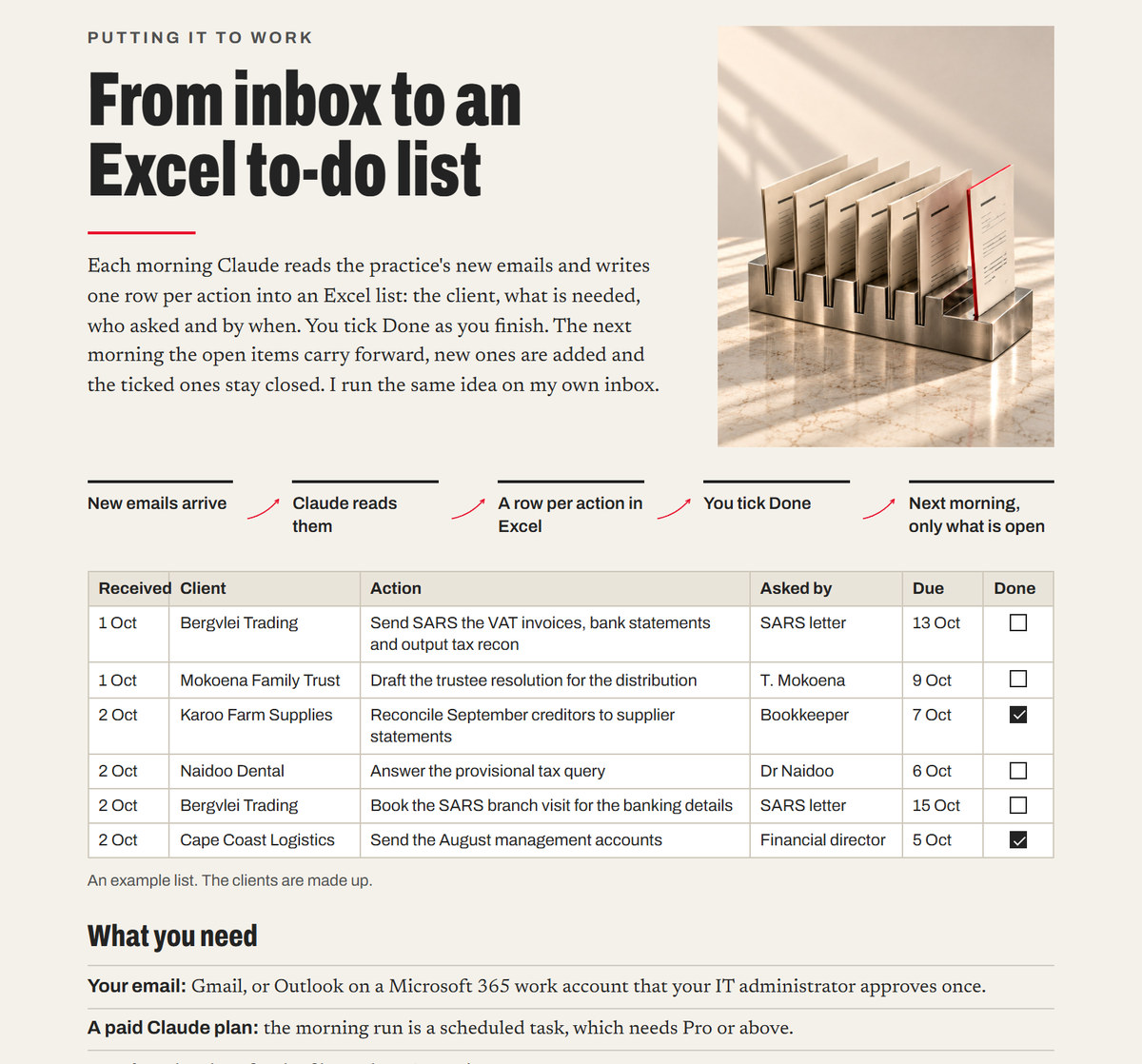
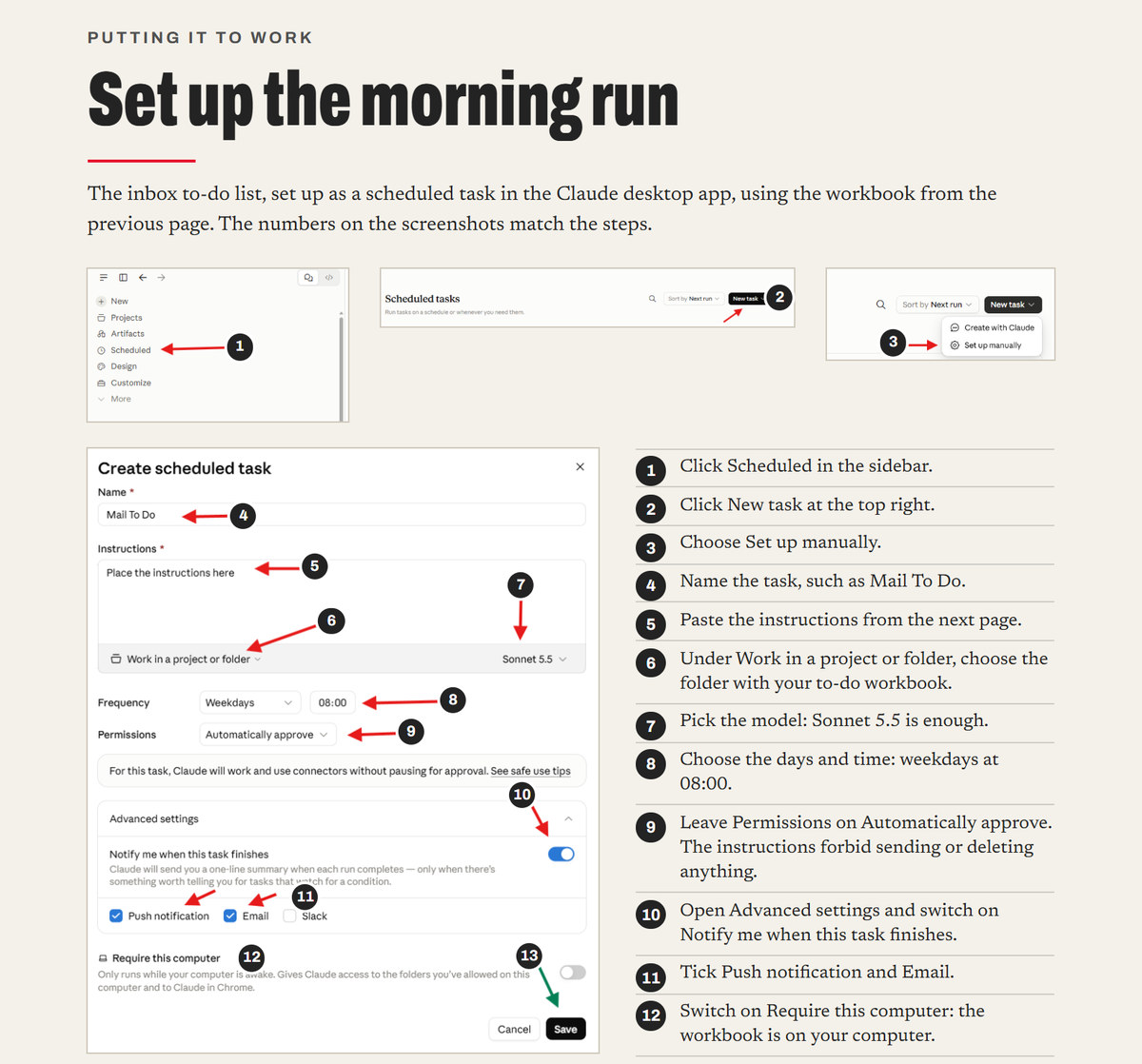
Here is what you will hold at the end, and what each piece does for you. The whole introduction as one file that opens in any browser and prints on A4, to come back to whenever a model, a setting or a client file raises a question. A workbook with the tabs, the headings, the Done list and the formulas already in place. The instructions for the morning run, ready to paste, with only the folder path to change. And the test emails, so the first run is proven on made-up clients before it reads real ones.
And the honest arithmetic. The whole course takes about thirty minutes, from what an AI model is to the first morning run. Set up once, the list is waiting each morning: what each client needs, who asked and by when, with the finished work closed for good.
From first steps to Claude at work. Here is the road.
- What an AI model isBASICS
- Which model, and whenBASICS
- The desktop app and OfficeSET UP
- Chat, Cowork and CodeBASICS
- Keeping client information safeSAFETY
- Your Claude settingsSET UP
- Instructions for ClaudeSET UP
- What Claude can reachSET UP
- Claude on your computerSET UP
- How to ask so the answer is usefulASKING
- Opus 5.5 and Fable 5.1BASICS
- From inbox to an Excel to-do listAT WORK
- Build the Excel workbookBUILD
- Set up the morning runRUN
- The instructions to pasteRUN
- Pro tipsHABITS
The pack
What this consists of
| In the pack | What it is |
|---|---|
| The Introduction | Every page of the course in one file that opens in any browser and prints on A4, with the contents linked to each page. |
| The Workbook | Inbox To-Do, ready to use: the tabs, the headings, the Done dropdown and the formulas. |
| The Instructions | The morning run's instructions as plain text, ready to paste, with only the folder path to change. |
| The Test Emails | Made-up client emails to send yourself, with the rows the first run should give and what the second morning should show. |
The clients in the examples and the test emails are made up, and so is every name and figure in them.
Free with your email
Get the course
Want help applying this to your own work? Arrange one-to-one training. The session is scoped and quoted around what you want to build.